
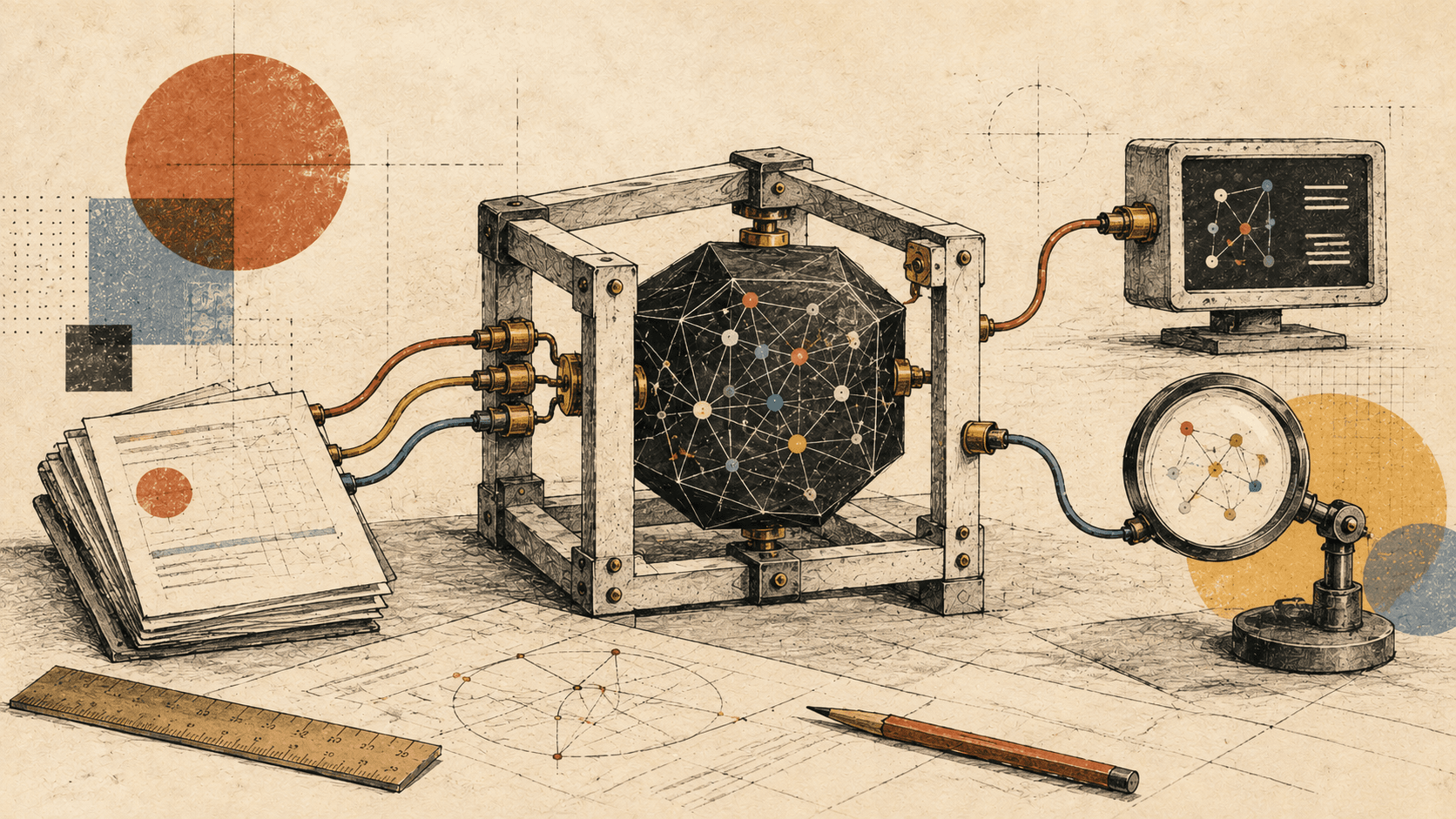
You ask a coding agent to fix a broken login form. It opens files, changes a function, runs the tests, reads an error, and tries again.
We usually describe this as the model fixing the bug. But something has to open those files, execute those commands, and bring the results back.
That surrounding software is the harness.
In my post about reading AI benchmarks, I looked at why a score measures a model together with its setup. The harness is one of the pieces in that setup. Here, I want to unpack what it actually does.
Start with one tool call
Suppose the model wants to inspect login.ts.
It can produce a structured request that means: “Read this file.” That request does not open the file by itself. Application code has to receive it, check whether it is allowed, read the file, and send its contents back to the model.
The model can then decide what to do next.
The same arrangement works for editing code, running a test, searching the web, or querying a database. The model requests an action; software executes it; the result becomes input for another model response. This request-and-result exchange is how application tools work. Tool-use documentation.
A useful working definition is:
A harness is the software around a model that manages what it sees, which tools it can request, how those requests run, and how the work continues.
Different projects draw the boundary slightly differently. Anthropic describes Claude Code's tools and context management as an agentic harness; Cloudflare distinguishes the harness's behavior from the runtime infrastructure beneath it. The responsibilities are more useful to understand than a perfectly rigid definition. Claude Code architecture, Cloudflare's explanation.
The chat window is one part of the system
It helps to separate three things:
- The interface: where you type, watch progress, approve actions, and review changes.
- The model: the component that interprets the supplied context and generates responses or tool requests.
- The harness: the software that connects those requests to tools and keeps the session moving.
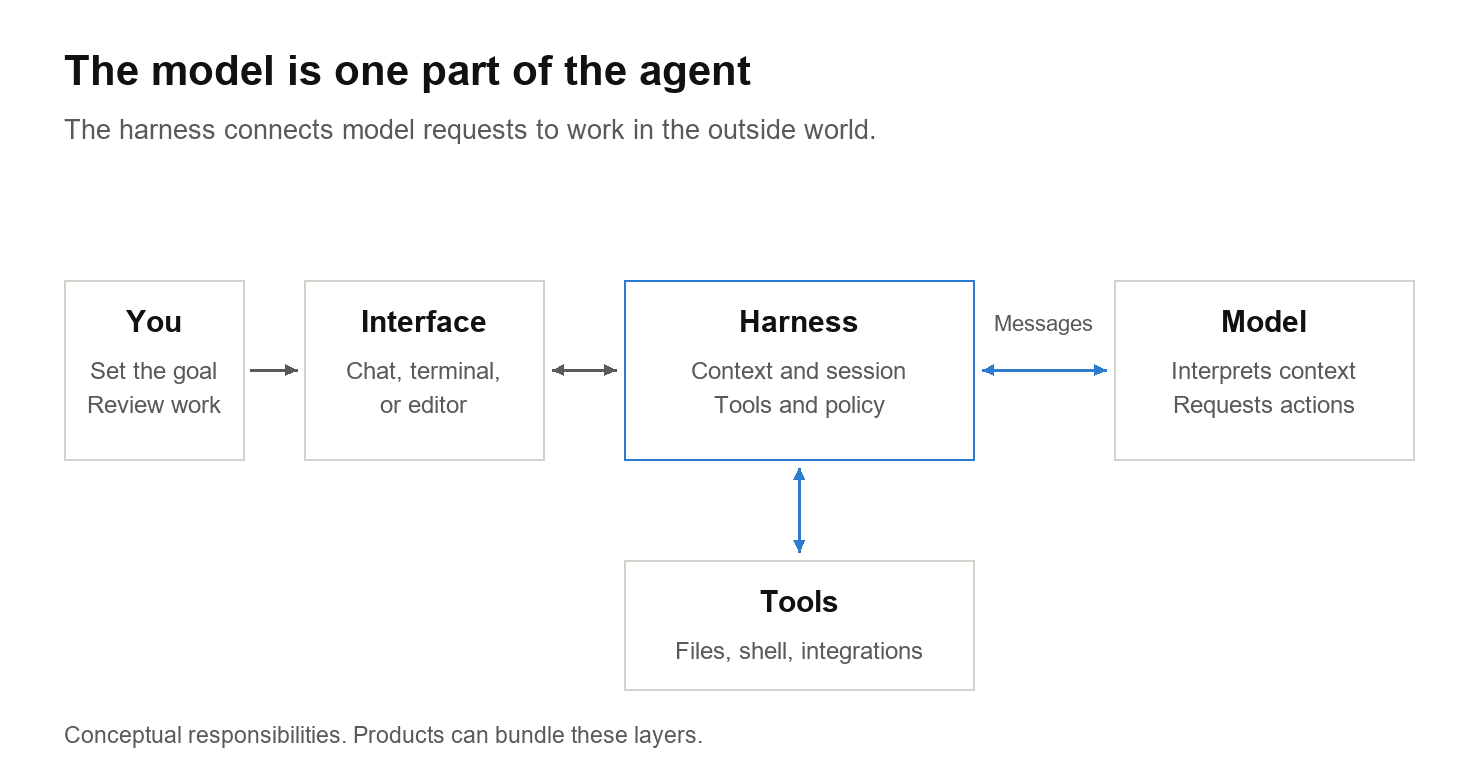
This is why calling Claude Code or Codex a harness can make sense, even though you also interact with them through an app or terminal. A product can contain both layers.
The separation becomes visible when another app reuses the underlying machinery. The Claude Agent SDK exposes Claude Code's agent capabilities to applications. Codex's app-server lets clients work with conversations, approvals, and streamed agent events. A new interface can build on an existing agent system. Claude Agent SDK, Codex app-server.
What happens after you press Enter?
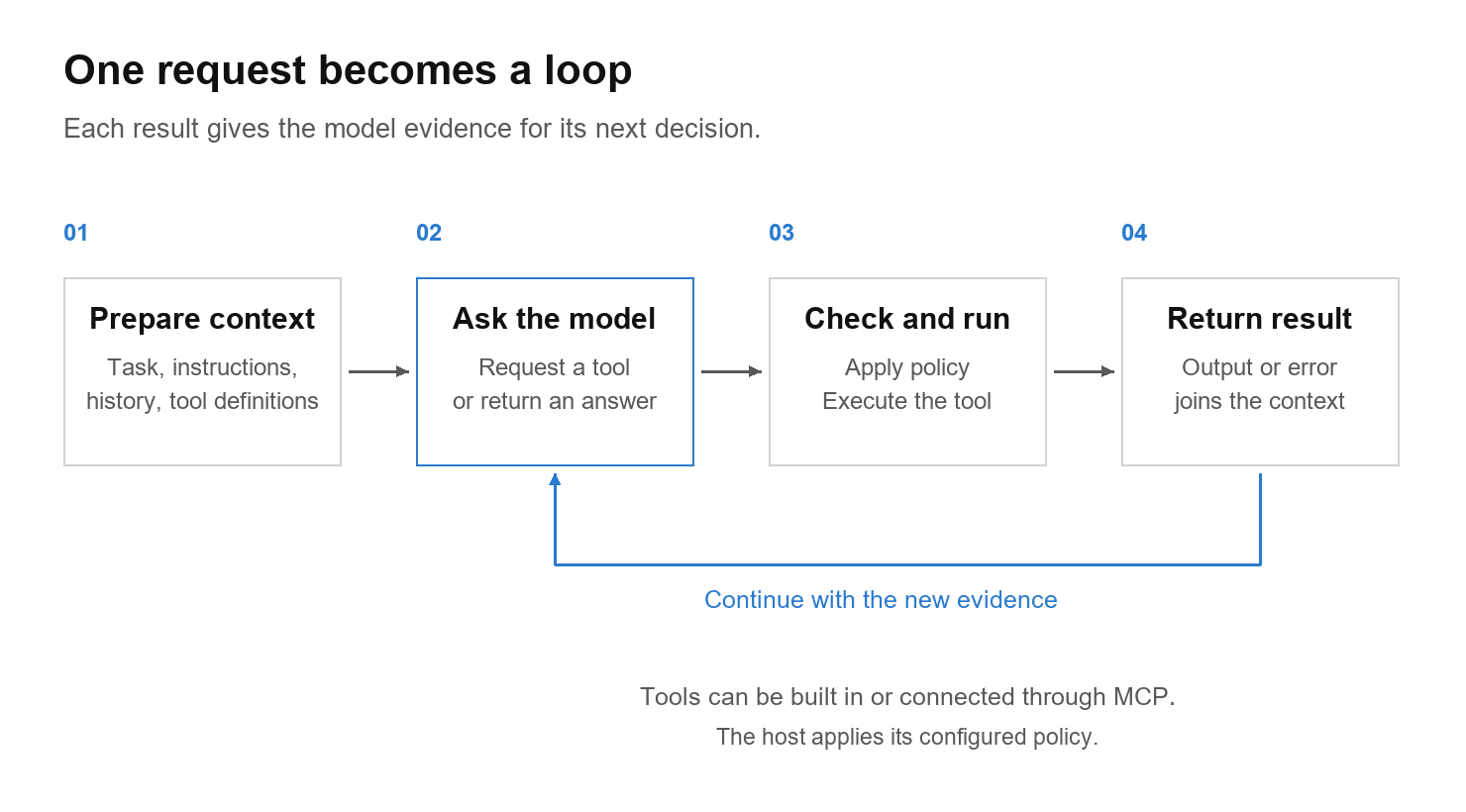
Return to the broken login form. A possible run looks like this:
- The harness prepares the request, relevant project instructions, conversation history, and available tool definitions.
- The model asks to read the login code.
- The execution layer checks the applicable rules, runs the tool, and returns the file contents.
- The model asks for an edit, then a test run.
- The test fails. Its output goes back to the model, which requests another change.
- The model eventually returns an answer, or the run stops because of an interruption or limit.
That is an agent loop. The exact sequence is chosen during the task; reading, editing, and testing are illustrative steps. Claude Code's documentation describes this as gathering context, taking action, and verifying results. How Claude Code works.
For this article, an agent is the working combination: a model operating through a harness, using feedback to choose further actions toward a goal. Anthropic makes a similar distinction between fixed workflows and agents that direct their tool use dynamically. Building effective agents.
The less visible work matters too
Running a tool is only part of the job. A useful harness also has to manage the information around each action.
Context. Which instructions, files, messages, and tool results should the model receive? Claude Code and Pi, for example, can compact older conversation history as the context grows. That creates room for more work, but a summary can lose details. It is not unlimited memory. Claude context management, Pi sessions.
Permissions. A model requesting a command does not settle whether it should run. Approval rules govern when the application asks you; sandboxing sets technical limits on what executing commands can access. These are separate controls. Codex security documentation.
Continuity. A long task may need progress notes, saved state, and checks that the work actually succeeded. In Anthropic's experiments with long-running agents, context compaction alone was insufficient; structured progress records and verification helped successive sessions continue the work. Effective harnesses for long-running agents.
Files such as AGENTS.md and CLAUDE.md fit into the context side. They can explain repository conventions and how to run tests. A sentence saying “do not edit this directory” is guidance to the model. A sandbox denying write access is an enforced boundary. Codex project instructions, Claude Code memory and instructions.
Where MCP fits
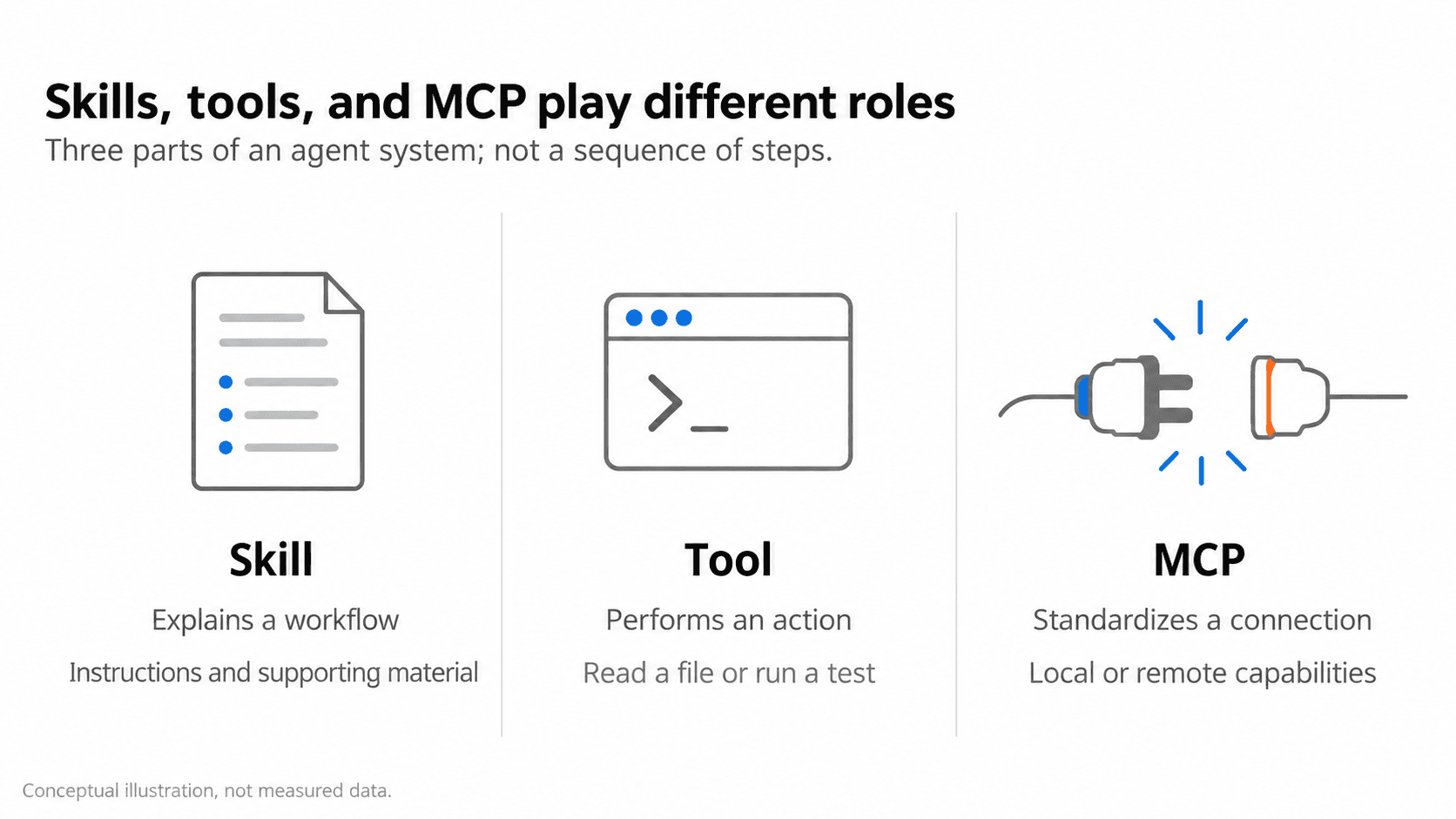
Some tools come with the harness. Others come from an integration.
MCP, the Model Context Protocol, is a standard way for an AI application to connect to capabilities supplied by another program. An MCP server can expose tools for actions, resources for context, and reusable prompts. MCP architecture, server concepts.
For example, an issue-tracker integration might expose a tool that fetches the bug report associated with your task. Its result enters the same model-and-tool loop as a file read.
The server can run on your machine or elsewhere. Local subprocess communication and HTTP are both supported. So the distinction is not “ordinary tools run locally; MCP runs remotely.” MCP describes how components communicate. MCP transports.
A skill serves a different purpose: it packages task instructions, sometimes with scripts and reference material. A skill might explain your release process; a tool can execute a step in that process; MCP can provide the connection to an external system. Agent Skills overview.
How some familiar harnesses work
These examples show different design choices. They are not a ranking.
Claude Code: a ready-made coding loop
Claude Code surrounds Claude with file operations, search, shell commands, context management, and permission controls. Its Agent SDK makes those capabilities available to Python and TypeScript applications. You can build an application around the existing loop, then extend it with custom tools, hooks, or subagents. Claude Agent SDK overview.
The useful distinction is between calling a model API yourself and embedding an agent system that already manages the tool loop.
Codex: tools, project context, and execution boundaries
Codex can inspect a project, edit files, and run commands. Repository guidance from AGENTS.md helps orient the work. Sandbox settings and approval policy constrain execution. Its app-server exposes the agent to custom interfaces, while the SDK supports programmatic automation. Codex CLI, project guidance, security, app-server, SDK.
Selecting a model is one choice inside this larger system.
Cursor: adapting the harness to the model
Cursor's agent combines a model with instructions and tools for searching, editing, and running commands. One revealing detail from its engineering team: the editing tools can differ by model. Their published example uses patch-based edits for OpenAI models and string replacements for Anthropic models. Prompts and context handling are also part of the harness work. Agent overview, Cursor's harness engineering post.
A harness therefore influences more than which tools exist. It also influences how the model is asked to use them.
Pi: a small core you can extend
Pi starts with four default enabled tools: read, bash, edit, and write. You choose the model; Pi manages the session and tool execution. Extensions can add tools or change the workflow. Pi tools, models, extensions.
Those four tools are a starting point, not a limit on what the system can support.
An app can coordinate existing harnesses
T3 Code makes another boundary visible. Its maintainers call it an “agent harness control surface.” Its source includes adapters for Codex's app-server and the Claude Agent SDK. The selected runtime still supplies the underlying agent loop, while T3 adds an interface and orchestration around it. T3 Code, architecture, Codex adapter, Claude adapter.
The app you use, the harness running the work, and the model answering requests can be separate choices.
What I would look at next time
When comparing coding agents, I would ask four questions alongside the model name:
- What can it inspect and change?
- What information does it carry into the next step?
- What stops an action or asks for approval?
- How does it check that the task is finished?
Those questions describe the system you are actually using. When an agent fixes the login form, the model helps choose the next action. The harness makes that action executable and returns the evidence for the next decision.
Inspired by Theo's “What is a harness?” explanation. Text and diagrams here are original. Product details were checked against primary documentation and source code on 26 October 2026.
Sources and further reading
- Anthropic — How Claude Code works
- Anthropic — Claude Agent SDK
- OpenAI — Codex app-server
- OpenAI — Codex security and approvals
- Cursor — Continually improving our agent harness
- Pi — Coding agent documentation
- MCP — Architecture
- Anthropic — Effective harnesses for long-running agents
- OpenCode — Client/server architecture
- T3 Code — Architecture